
Hostinger is a web hosting provider that offers everything you need to create and launch a website. Highly recommended by WordPress.org, it currently supports over 2m+ website owners. It’s known for its responsive customer support and provides an easy-to-use interface that showcases its impressive range of features.
Despite these strengths, a common concern among novice and experienced website owners remains: How does Hostinger manage to maintain such high quality amidst growing customer numbers? Like Hostinger, many web hosting providers promise exceptional services online, but the real test comes when you try them out.
This review covers everything you need to know about Hostinger, including its plans and the reliability of its services. We’ve purchased a hosting plan from Hostinger and conducted a hands-on test and review to give you a clear picture. With this information, you can determine if Hostinger is the right hosting for you.
Interested? Keep reading to discover our test results. Exclusive offer: You will get two free months with a free domain for the first year and free website migration when you choose any of its 48-month plans.
Hostinger
Hostinger is incredibly user-friendly, making it accessible even for those without technical experience. It boasts numerous excellent features and tools that assist in setting up, monitoring, and troubleshooting your site effortlessly. Additionally, it offers great value and reliable web hosting plans for every need.
- Free website migration
- Free domain name ($9.99 value)
- Unlimited Bandwidth
- Servers in strategic locations (including the US)
- 24/7 Customer Support via live chat
- Custom hPanel control panel
- 99.9% uptime guarantee
- AI-powered website builder
- LiteSpeed Web Server Technology
- No phone Support
- No dedicated server hosting
- Monthly plans cost more with a setup fee (A common advice is to go for long-term plans)
Key Features of Hostinger
What sets a web host apart from others is the reliability of its services. A good web host should offer enough storage space, unlimited bandwidth, stable uptime, fast loading speeds, and robust security features. To start this Hostinger review, we’ll cover everything you need to know about its web hosting features.
Free Website Migration
If your current host can no longer handle much traffic or lacks good technical support, you can easily migrate your website to another host that offers improved security, customer support, and better deals. Hostinger offers a free migration tool that allows you to transfer your website from another host within 24 hours.
How to Migrate Your Website to Hostinger?
If your website is currently hosted on a different platform, you can migrate it to Hostinger by following the steps below:
Step 1. Requirements: You can use the free migration tool if your website is currently hosted on another platform and built on an open-source CMS like WordPress or Joomla.
Step 2. Buy a hosting plan: If your website meets the requirements above, kindly proceed to select your preferred hosting plan. Then add at least one domain to your active hosting plan.
Step 3. Migrate website: You can initiate the migration request by locating the profile icon. Click on Migrate Website.
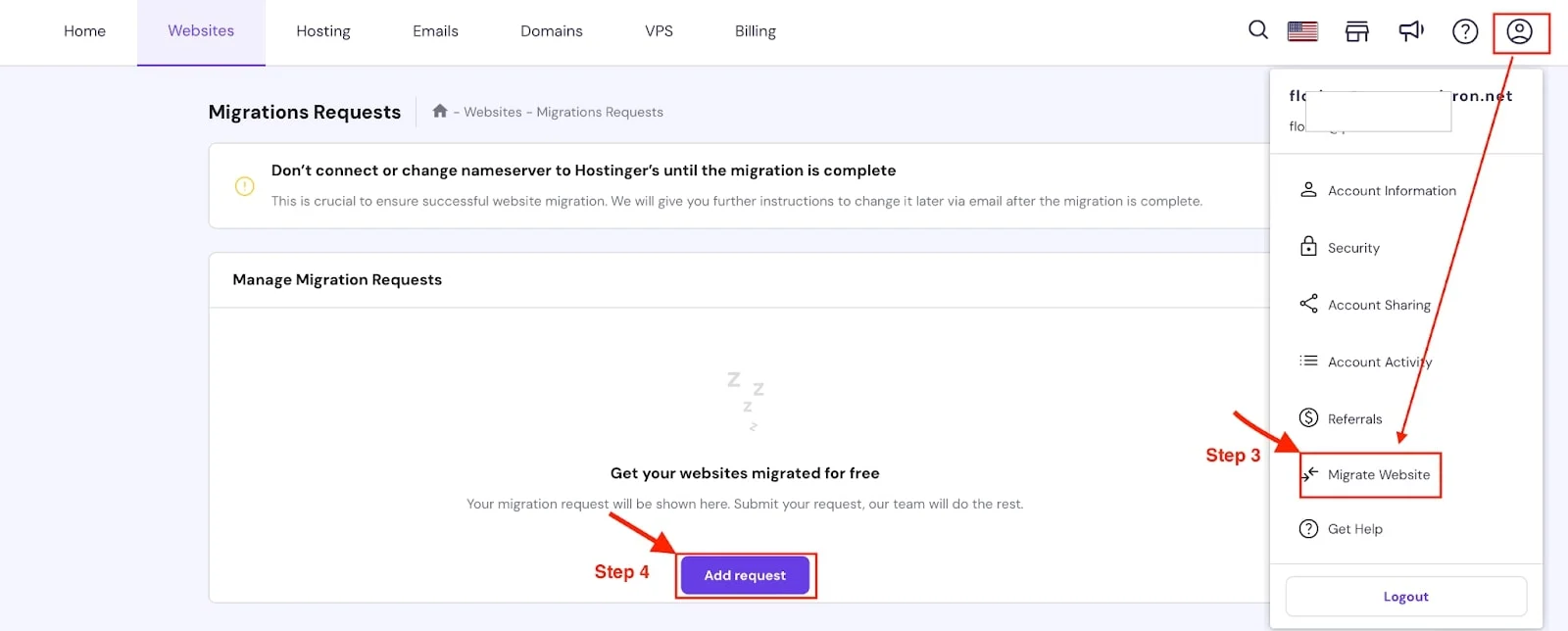
Step 4. Complete the request: Select Add Request, fill in the required details, and submit the website migration request.
Step 5. Point your domain to Hostinger: After the successful migration of your website, proceed to point your domain to Hostinger servers.
Free Domain
Not all hosting providers offer a free domain for new customers, but many do. This feature can help you save costs when you create a new website or migrate from another host.
Hostinger provides a free domain, allowing you to choose one free top-level domain (TLD) from the available options when you purchase a long-term plan of one year or more. You won’t receive a free domain if you opt for a monthly plan.
Get a Free Domain Name With Hostinger
Advanced Security Features
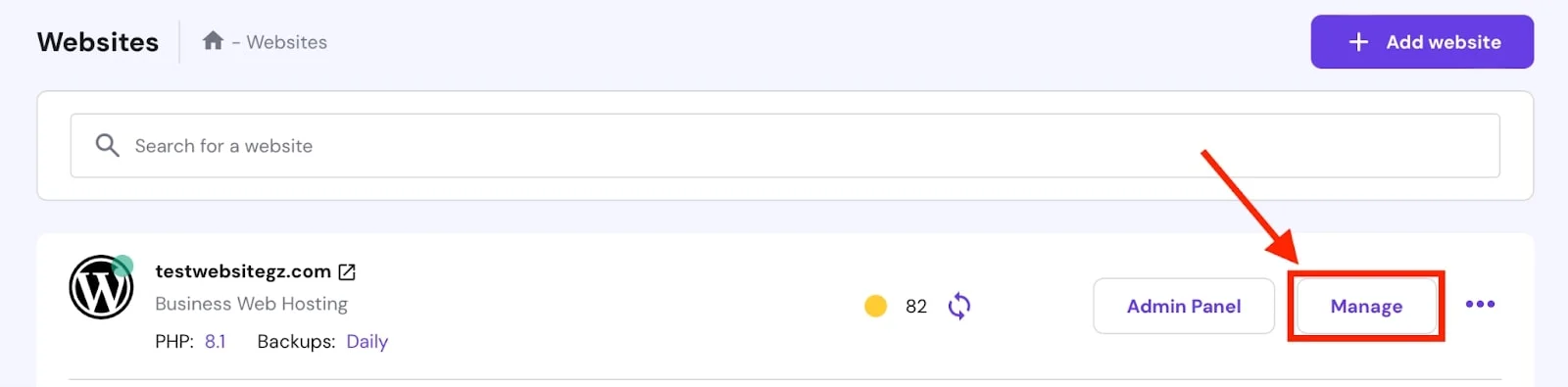
Another key point to analyze in this Hostinger review is security. Every day, websites face attacks from hackers and malicious bots aiming to compromise data. With Hostinger, you can use the malware scanner available in the hPanel dashboard to check your website for malware. To access the malware scanning tool:
- Go to the Website and click on Manage
- On the left sidebar, click on Security
- Click on Malware Scanner from the drop-down menu
Consequently, most web hosts provide security features to protect your data and secure your site. According to our test, Hostinger excels in this area by offering unlimited SSL certificates to encrypt website traffic and Cloudflare nameservers to safeguard against DDoS attacks.
Additionally, their automatic backup feature helps secure your files in case of any security breaches. Hostinger has established itself as a reliable hosting provider, boasting a 99.9% uptime guarantee that ensures your website remains operational with minimal downtime.
After testing Hostinger hosting for several months, we confirmed that the uptime indeed corresponded to the stated value.
Maximum Website Speed
Your choice of web host can impact your website’s loading speed. If your website refuses to load on time, it can bounce your audience off your site and drive them away. Therefore, it is important that you choose a hosting provider that stores your website files on a web server.
Hostinger uses LiteSpeed web server technology and advanced cache solutions to enhance your website’s loading speed and optimize performance. It also uses Object Cache for WordPress to reduce website response times up to three times.
These features are strong indicators of Hostinger’s reliability, ensuring the speed and performance your website requires.
Multiple Data centers
Did you know that the location of your website’s data center can lead to latency issues, affecting loading times and overall user experience? If your server is located far from your users, data has to travel longer distances, which can slow down your website’s speed.
Therefore, it’s crucial to select a web host with data centers near your website visitors.
Hostinger provides server locations across the globe, including in the USA, the United Kingdom, France, India, Singapore, Indonesia, Brazil, Lithuania, and the Netherlands. With such a large network, you have the flexibility to choose the closest data center to your target location.
Additionally, you can change the location of your data center once every 30 days at no extra cost. This means that our review of Hostinger can only be excellent and further confirms that you will enjoy better speed, lower latency, and improved customer experience.
Customer Support Services
Customer support is the backbone of web hosting. It provides you with the opportunity to ask technical questions about services on the platform that may not be clear to the average beginner. A good web host should offer 24/7 access to experienced agents or technical support experts who can provide the help you need.
With Hostinger, you can contact its agents through live chat and email. It doesn’t offer phone support to avoid keeping you waiting for an answer. Nevertheless, you will still get more support from their customer success team anytime you need help.
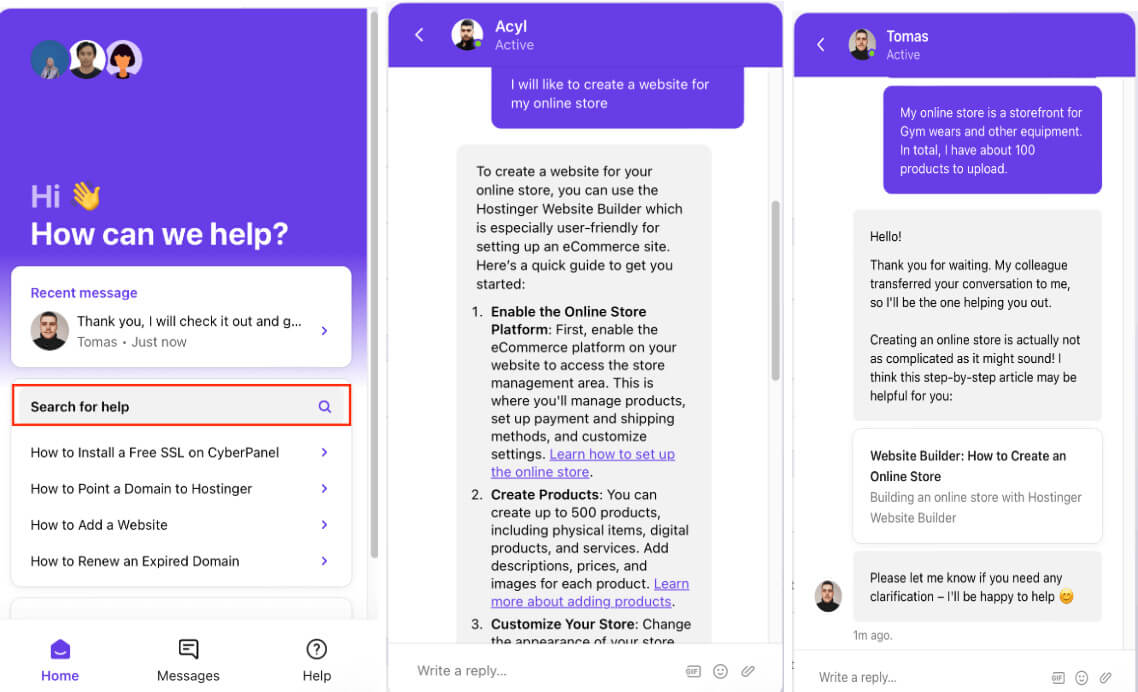
According to our tests, you can expect to receive a response within a few minutes via live chat. As soon as you click on the live chat icon, you can search for any query and instantly access a how-to guide.
Additionally, Hostinger offers a wealth of resources such as tutorials, blogs, and a knowledge base to help answer any further questions you might have. However, if you prefer to chat with a customer success agent to ask questions or make an inquiry, click on “Send us a message” to start the live chat.
To test the response time of Hostinger’s support specialist, we sent an inquiry. Initially, a bot addressed our questions by scanning the website for similar existing answers. Subsequently, we requested to speak with a live agent, and the response time was recorded at 15 minutes.
Considering Hostinger serves over two million customers worldwide, this response time is quite reasonable.
Hostinger Services and Pricing
Hostinger, like many other hosting providers, offers different types of web hosting services, but not dedicated server hosting. In our Hostinger review, we explored some of these services, the plans they offer, prices, and features. We also recommended what each plan is best for and how to get the best value for money.
Please note that no Hostinger promo code is required to take advantage of the listed prices. Simply click on one of the buttons or links in this article.
Shared Web Hosting on Hostinger
This type of hosting is recommended for small and medium websites only. This means there is a limit to what this basic hosting tier can handle. It is what it says it is, and you will share resources with other websites on the same server.
As a result, shared hosting is cheap and beginner-friendly for new website owners. It offers an entry-level opportunity to explore your ideas and reach your audiences. The downside is that if your website is on a server that has websites with good traffic, your website will be slow. However, it is very cheap and easy to set up.
Hostinger offers three customized web hosting plans: Premium, Business, and Cloud Startup.
- The Premium plan costs $2.99 per month for 48 months. The plan allows you to host up to 25 websites per account, 25 GB of SSD storage, a free domain for longer terms only, unlimited free SSL, unlimited bandwidth, weekly backups, free email, and more.
- The Business plan is available for $3.99 for 48 months. The plan allows you to host up to 50 websites per account, gives you access to 50 GB of NVMe SSD storage, daily backups, a free domain for the first year, unlimited free SSL, unlimited bandwidth, free email, free CDN, and more.
- The Cloud Startup plan is priced at $7.99 per month for 48 months. The plan offers maximum performance, allows up to 100 websites per account, 100 GB NVMe Storage, a Dedicated IP address, daily backups, a free domain for the first year, unlimited bandwidth, and more.
Note: All discounted prices still renew at the monthly price, but allow you to save costs for a long-term period.
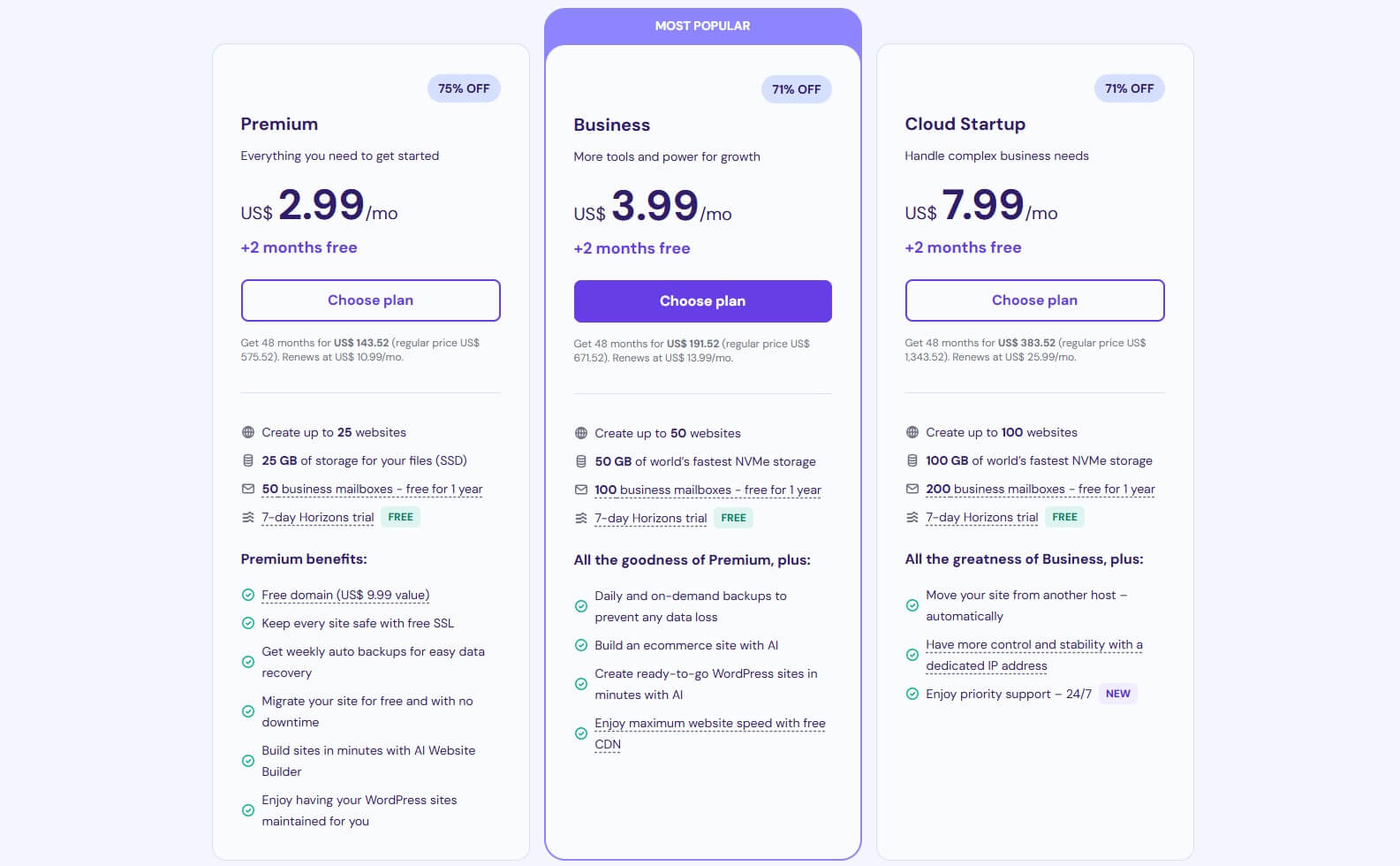
Verdict: The positive thing about these offerings is that you can easily scale up or down depending on how much performance you need for your website or the resources you need to power your website.
For most people (those making a website for the first time), the Premium or Business plan is more suitable. Also, it is advisable to go for long-term plans, so you can enjoy the discounts and benefits on offer.
Cloud Hosting on Hostinger
Unlike shared hosting, Cloud hosting is more dedicated and offers up to 20x more resources. It provides superior performance by utilizing resources from multiple servers. Cloud hosting operates by distributing your website files across a network of connected virtual and physical cloud servers.
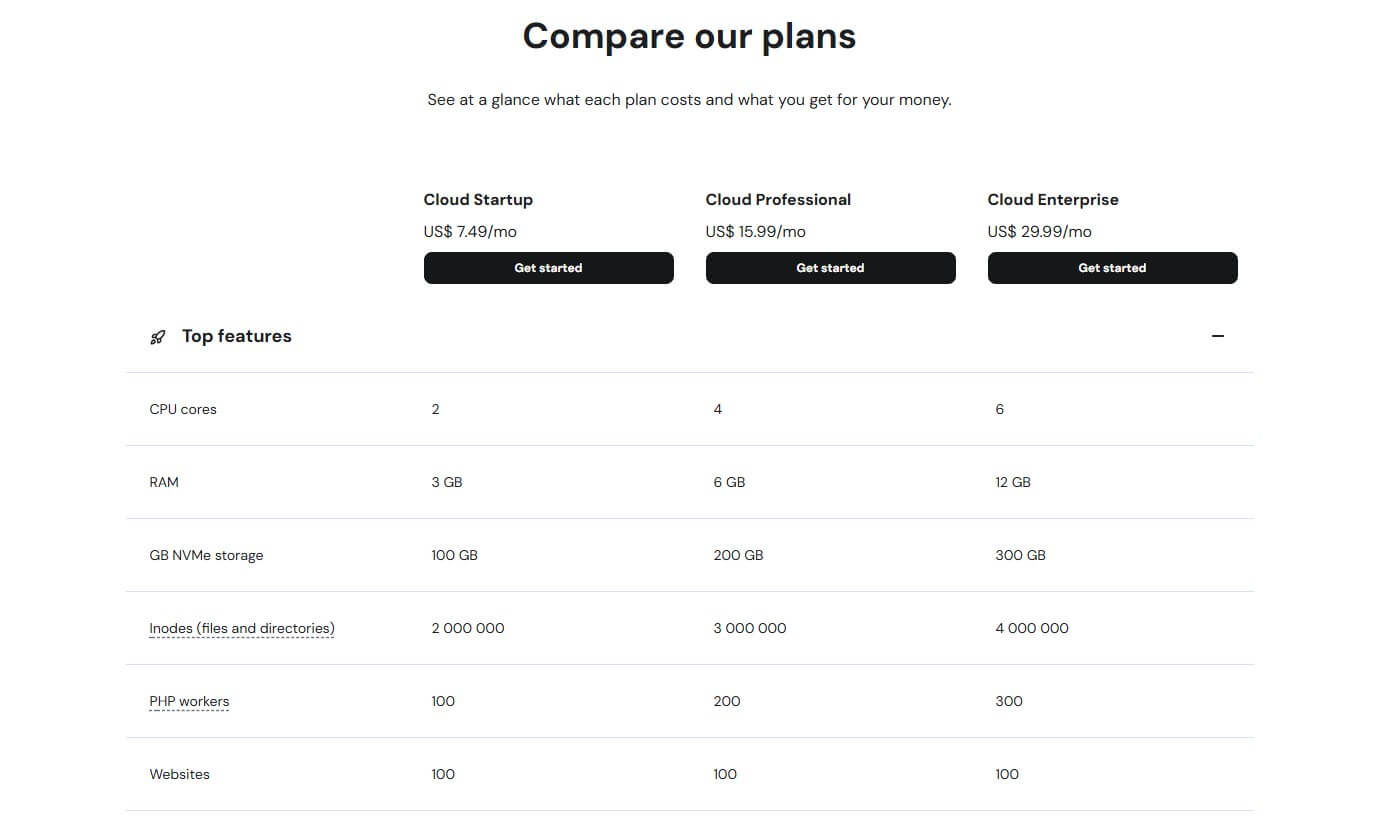
With Hostinger, Cloud hosting is recommended for large-scale projects. Your website will be hosted on a cloud-based web server that offers more speed than shared hosting to increase user experience and decrease website loading time. Hostinger offers three Cloud Hosting plans: Startup, Professional, and Enterprise.
- The Cloud Startup plan costs $7.49 per month for 48 months. The plan comes with 3 GB RAM, 200 GB Storage, two CPU cores, 100 PHP workers, and more.
- You can get the Cloud Professional plan for $15.99 per month for 48 months. The plan comes with 6 GB RAM, 200 GB Storage, four CPU cores, 200 PHP workers, and more.
- The Cloud Enterprise plan is available for $29.99 per month for 48 months. The plan comes with 12 GB RAM, 300 GB Storage, six CPU cores, 300 PHP workers, and more.
VPS Hosting on Hostinger
With VPS hosting, Hostinger configures multiple virtual machines on a single physical server. These virtual machines operate independently, ensuring that the performance of one does not impact the others, unlike in shared hosting.
Hostinger’s VPS hosting uses the industry-standard KVM virtualization platform, offering more power and control than shared hosting. It also features NVMe SSD storage and AMD EPYC processors for robust performance.
This VPS solution allows you to install any software you choose, supporting various operating systems, control panels, and applications.
Hostinger offers four VPS Hosting plans: KVM 1, KVM 2, KVM 4, and KVM 8.
- The KVM 1 VPS plan is priced at $4.99 monthly for 24 months. The plan comes with a single vCPU core, 4 GB RAM, 50 GB NVMe SSD, 4 TB bandwidth, and more.
- The KVM 2 VPS plan costs $6.99 monthly for 24 months. The plan comes with two vCPU cores, 8 GB RAM, 100 GB NVMe SSD, 8 TB bandwidth, and more.
- The KVM 4 VPS plan costs $9.99 monthly for 24 months. The plan comes with four vCPU cores, 16 GB RAM, 200 GB NVMe SSD, 16 TB bandwidth, and more.
- You can get the KVM 8 VPS plan for $19.99 monthly for 24 months. The plan comes with 8 vCPU cores, 32 GB RAM, 400 GB NVMe SSD, 32 TB bandwidth, and more.
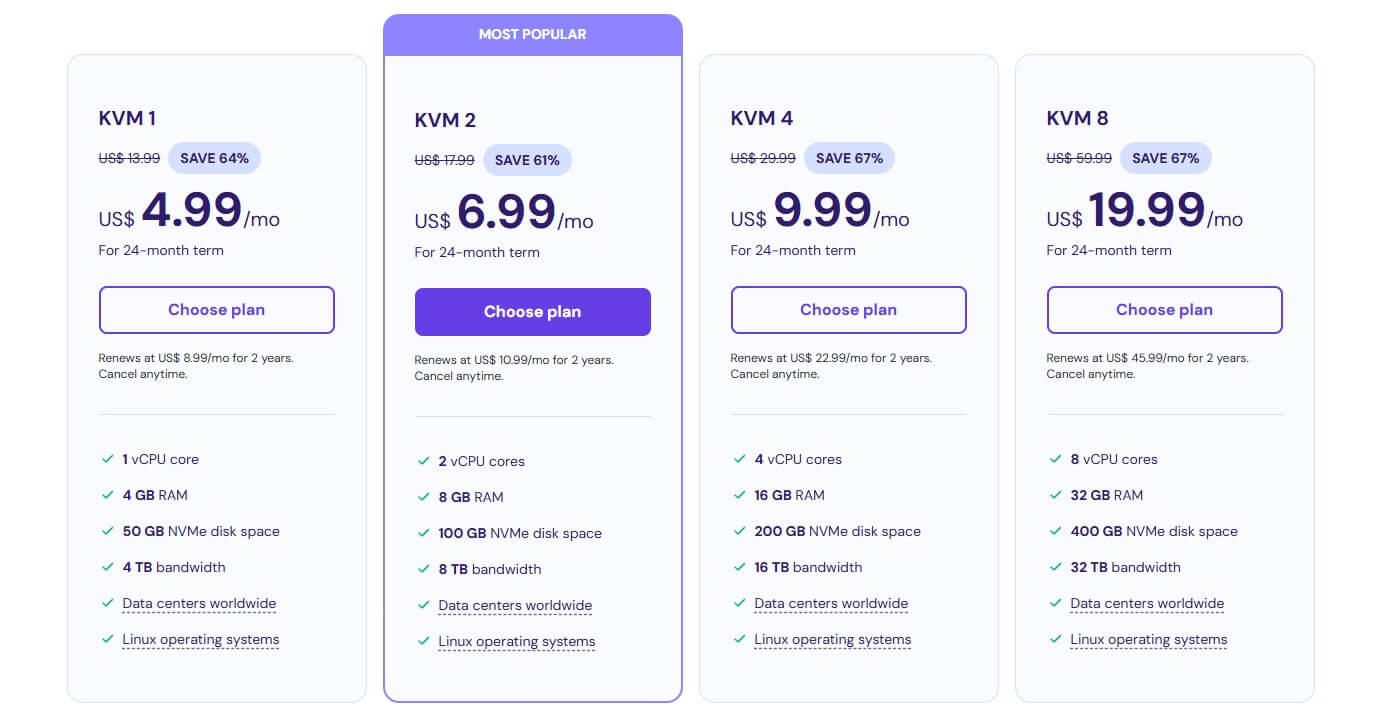
Note: VPS plan renewal rates vary depending on the long-term option you choose. You can easily scale your plan up or down to meet your website’s requirements.
Managed WP & WooCommerce Hosting on Hostinger
If you are looking to create a website with WordPress or set up your eCommerce store with WooCommerce, we highly recommend Hostinger as the perfect host for these purposes. Its managed WP hosting offers the best solution 99% of the time and comes packed with premium built-in features that ensure lightning-fast performance.
During our review, we discovered that Hostinger’s built-in CDN improved our test website’s speed by up to 40%. This contributed to quicker load times, an improved user experience, and positively impacted our site’s Google Key Web Vitals results.
That’s not all; your WordPress website will also receive a complete development toolkit, automatic updates, backups, a one-click staging tool, and robust security features for maximum protection.
Additionally, you’ll benefit from hosting specifically built for WordPress and managed by Hostinger, ensuring top-notch performance. Also, Hostinger’s Managed WP hosting plans include both shared and cloud hosting pricing. However, if eCommerce is your forte, you can opt for Hostinger’s managed WooCommerce solution.
With Hostinger, you will get:
- A free domain for your brand
- WooCommerce install in one click
- Secure cloud servers that guarantee high uptime and performance
- Automatic backups to prevent data loss
- Free SSL certificates to encrypt and protect your client’s sensitive information
- Low latency and maximum speed thanks to IPV6 and HTTP/3
Hostinger also offers managed WooCommerce plans suitable for beginners and large online stores. During our in-depth review, we found that optimizing our test website with LiteSpeed cache, CDN, and object cache significantly increased our monthly visits. It’s vital to pick your plan based on the number of visits you expect.
Minecraft Server Hosting on Hostinger
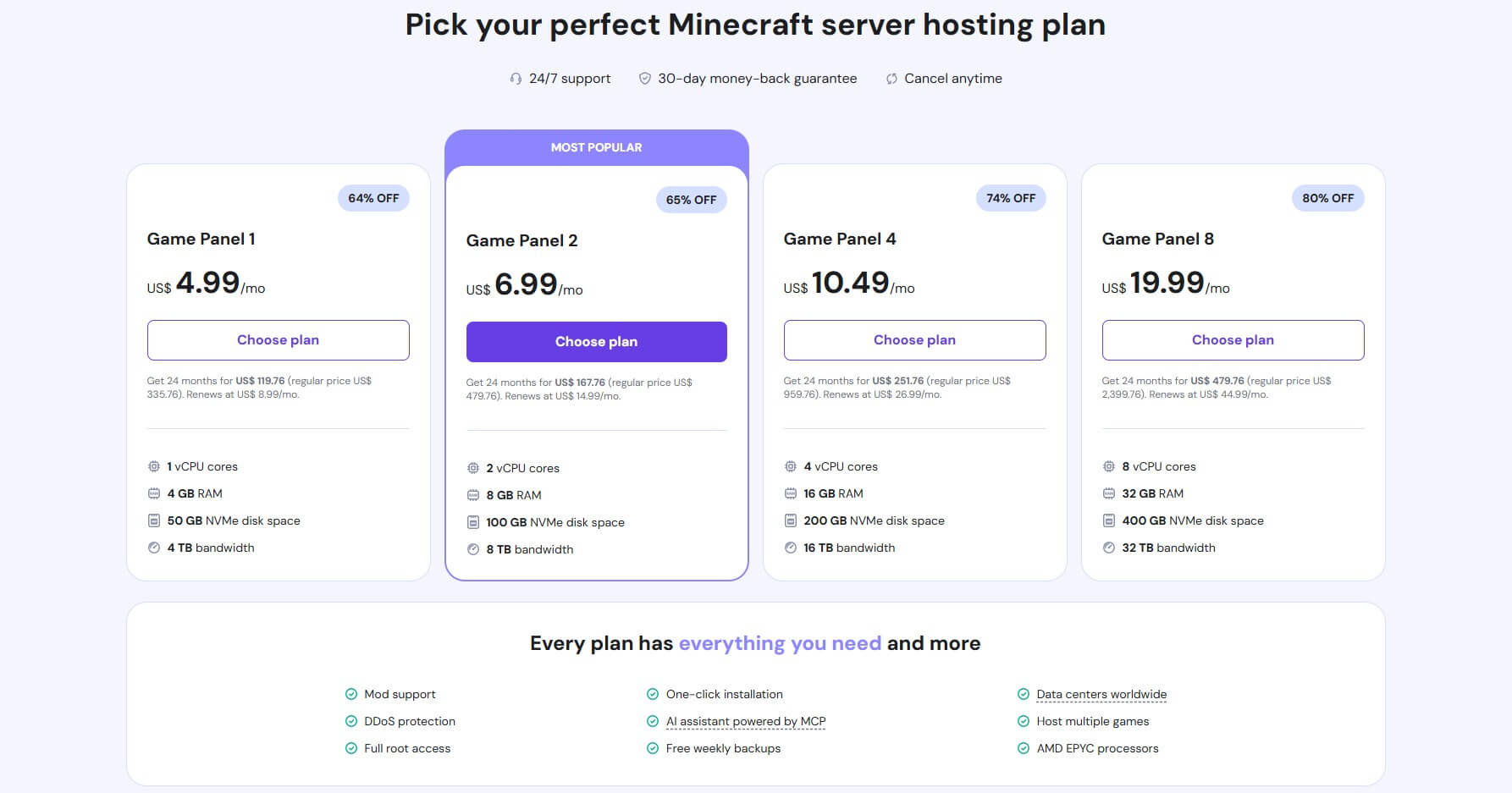
For Minecraft game lovers looking to set up their server, Hostinger offers reliable Minecraft server hosting. This solution comes with pre-configured Minecraft servers built on VPS infrastructure. This allows for easy and instant setup within five minutes with full root access to configure your server.
During testing, we found that the performance of Hostinger’s Minecraft hosting solution was excellent. Beyond the fast deployment time, we discovered the following:
- Lag-free servers
- Multiple server locations that ensure Low latency for your players
- One-click installers for pre-selected plugins and mods
- Top-level data backups to save and restore your game progress
All of this explains why it ranks at the top of our list of the best hosting providers for Minecraft servers. Hostinger uses NVMe storage and industry-standard AMD EPYC processors that guarantee rock-solid performance. For budget-friendly Game Panel 1, the performance was worth the price for hosting up to ten players.
If you plan to host a server for multiple players up to 50 or more, consider other options, like Game Panel 1, 4, or 8. The Game Panel 2 plan at $6.99 is optimal from a price-to-performance aspect. However, if you plan on hosting a larger server with more players, the latter two may be your preferred picks.
Getting Started – How to Host Your Website on Hostinger?
In this section of our review, we will discuss everything you need to know before launching your website with Hostinger.
Purchasing a plan
To get started, simply visit the Hostinger website and browse through the available hosting options. At this point, given our discussion of Hostinger’s hosting services in this review, you should have a clear idea of the type of hosting you need.
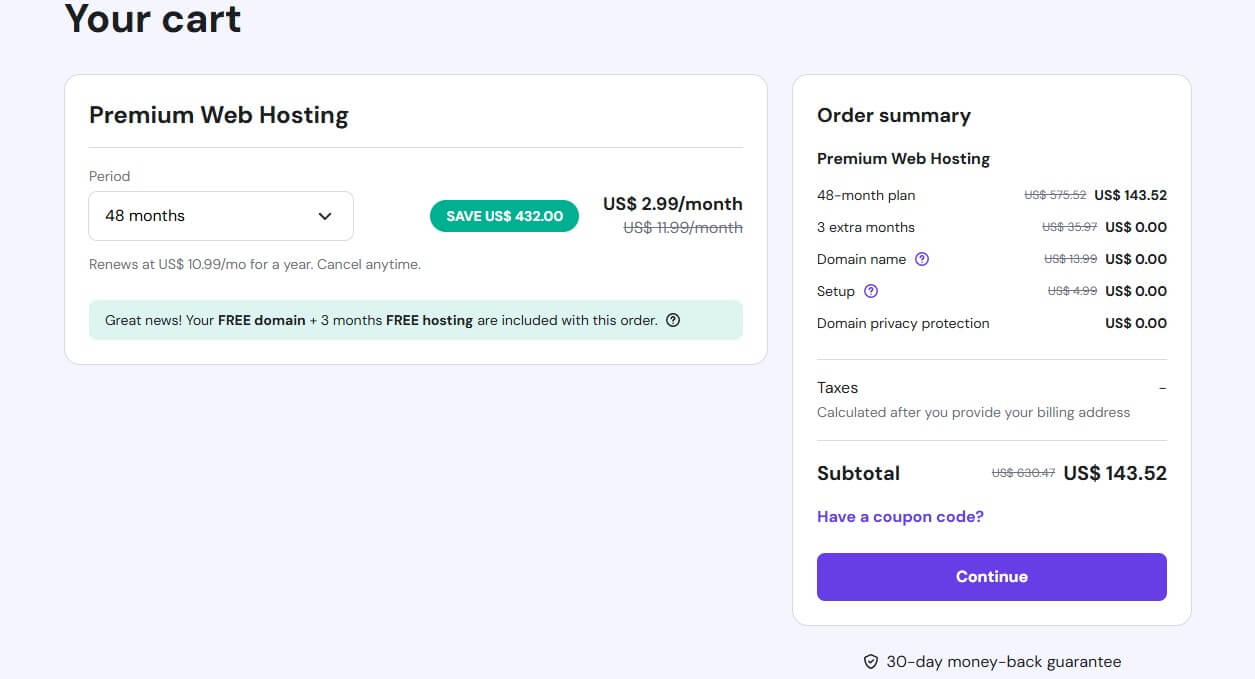
To create our test website, we selected the Premium web hosting plan and then clicked Choose Plan. On the next page, we were prompted to select our preferred subscription duration. Choosing a longer term (48 months) provides a lower monthly rate and exclusive discounts, helping you save on costs.
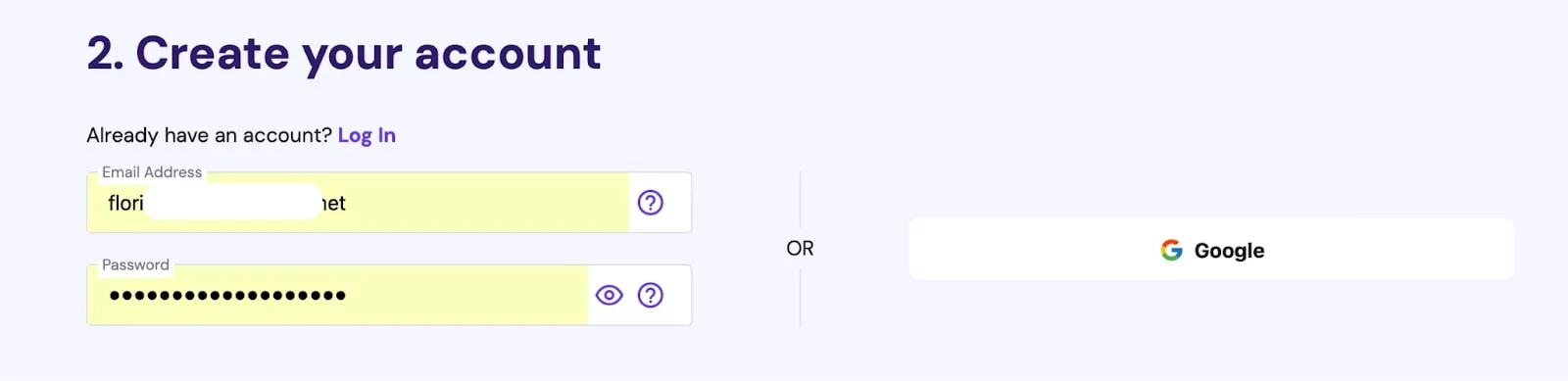
The next important step is to create an account. Since we already had a Hostinger account, we entered our email address and password. If you don’t have an account yet, you can click on the Google icon next to the login area to continue.
The final step involves making a payment using the available options. You can pay with your credit card by entering your card details and clicking Submit Secure Payment, or you can choose another payment method, click on Submit Secure Payment, and follow the instructions provided.
Creating a website
Let’s continue our Hostinger review with the Onboarding process. After purchasing our plan, we logged in to our hPanel dashboard and proceeded to add a website.
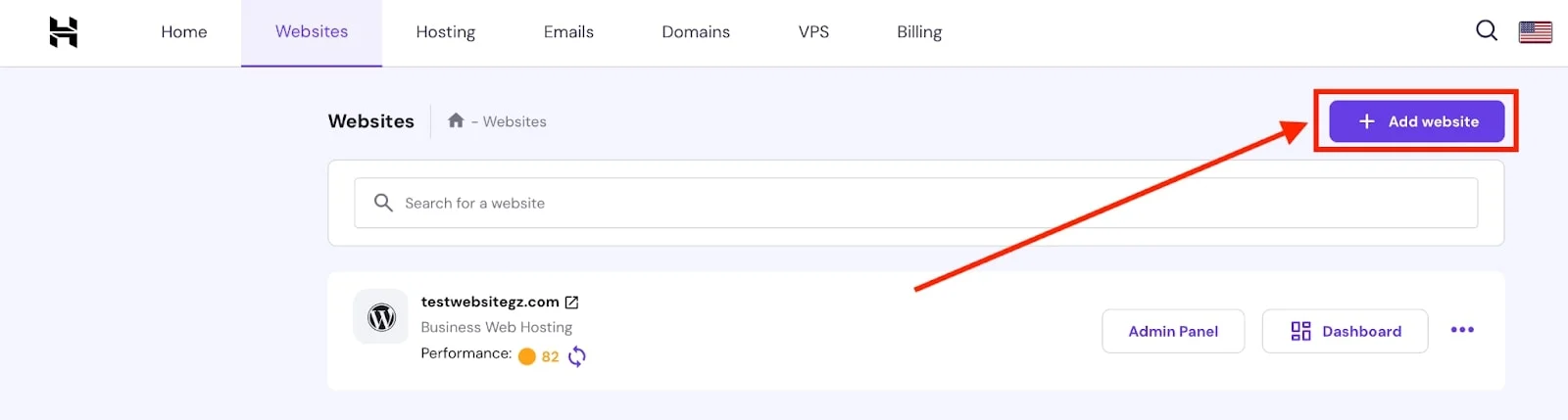
The onboarding process allowed us to create or migrate a website. If you do not have the technical knowledge to develop a website from scratch, you can choose the Hostinger website builder or WordPress with AI to make the process easier.
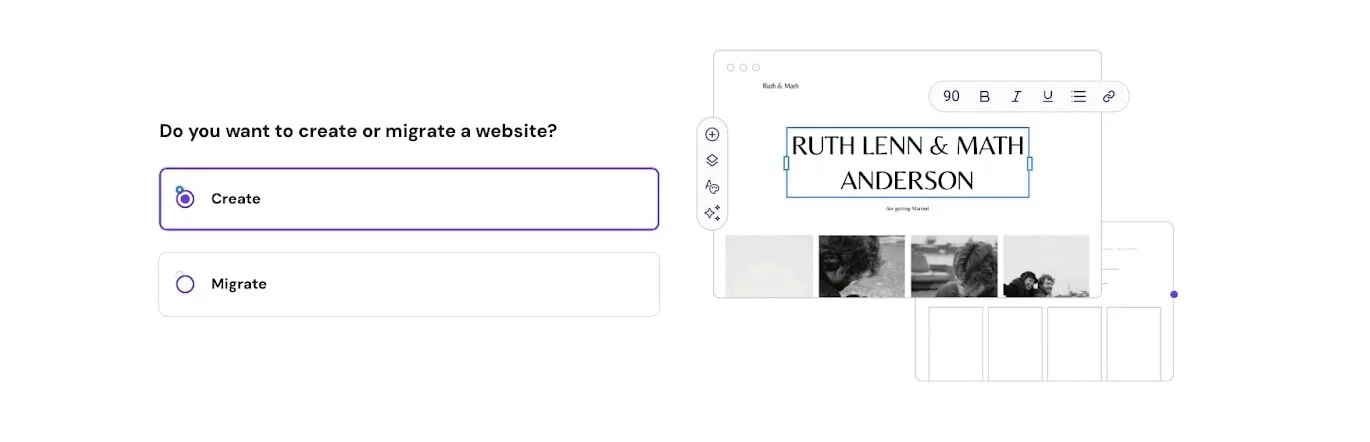
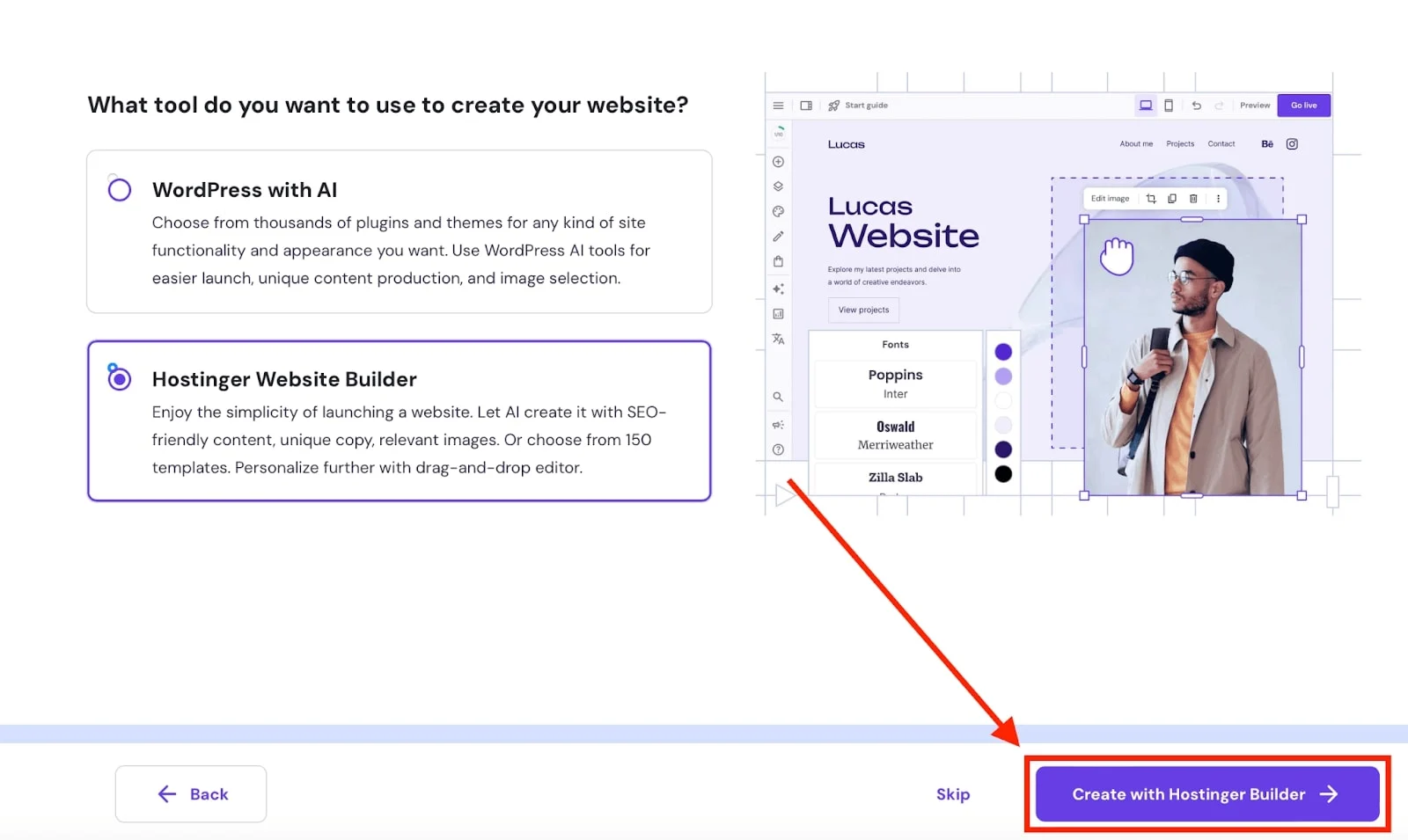
After we clicked on Create with Hostinger Builder, we entered our domain name for the test website.
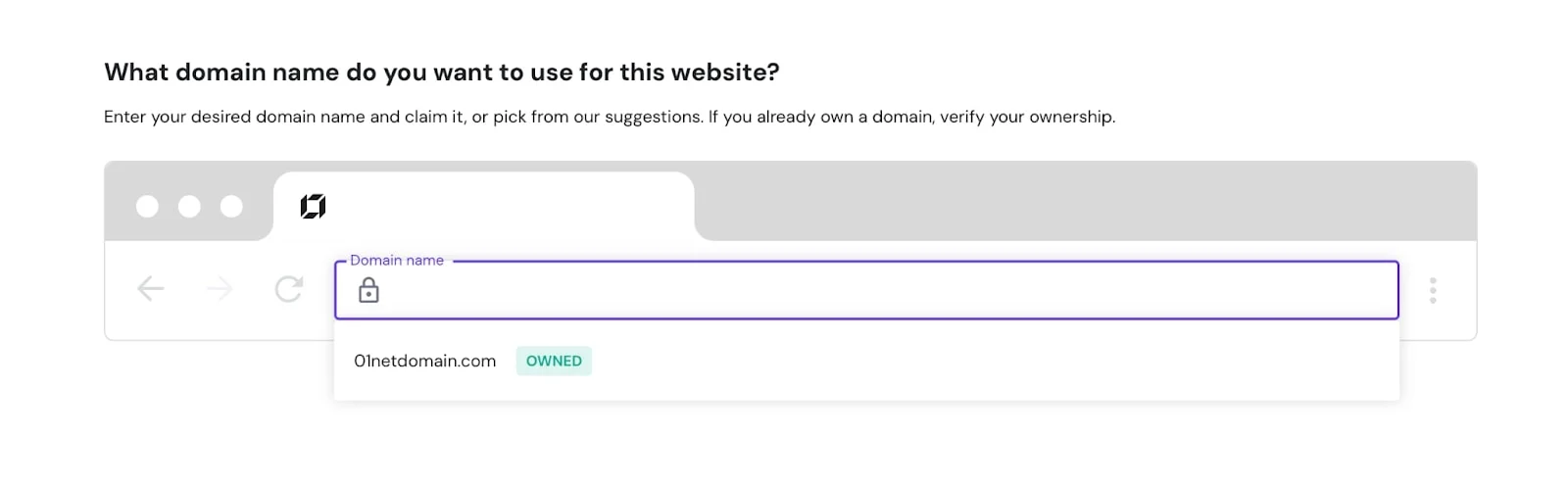
You can use AI to start creating your website or select pre-made templates to get started. We decided to use AI since our test website was created to evaluate the performance of Hostinger’s web hosting services.
The onboarding process was seamless and intuitive. We clicked Start Creating, entered our brand name, selected the type of website we wanted to build, and added a brief description.

After clicking Create a Website, the AI assistant used the provided information to design a layout, add pictures, and provide unique content to complete the website setup.
Create a Website With Hostinger
Finally, Hostinger’s website builder allowed us to edit the test website and included a Site setup checklist that helps optimize your site for Google. You can also add elements, manage pages and website styles, adjust settings, and preview both desktop and mobile versions before publishing. See the result of our test website below.
How to Upload a Website
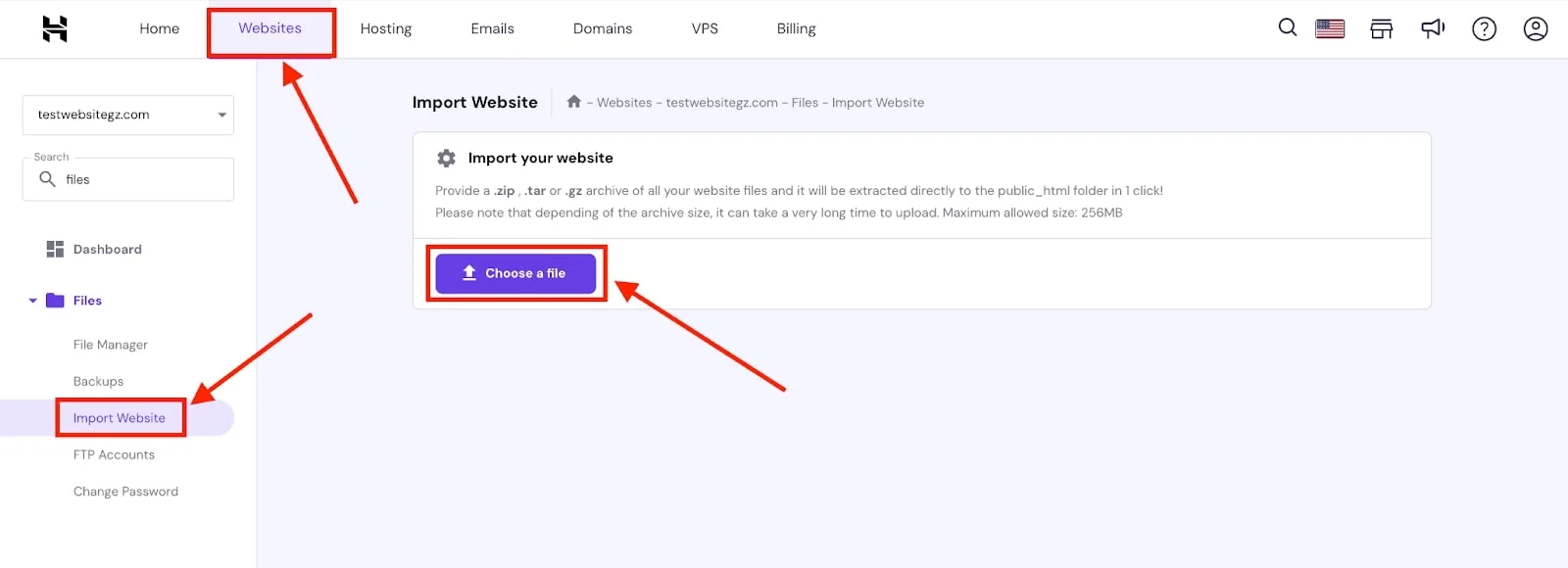
If you’ve already built a website, you can use the import website feature in Hostinger’s hPanel dashboard to upload it.
- Go to Websites → Manage.
- In the left side panel, search for files.
- Navigate to Import Website and click on it.
- Then choose a file to select and upload your .zip, .tar, or .gz archive of your website files
- Afterward, click on Import, and your content will be extracted to the public_html folder of your website.
Speed and Performance Tests for Hostinger
Understanding the importance of good website performance and its effect on user engagement, we conducted tests on Hostinger to evaluate its capabilities. To start our Hostinger review, we purchased a business plan, created a test website, and published it.
We’ll use the test website to evaluate Hostinger’s speed, response time, and overall performance. Therefore, we did an in-depth review of Hostinger’s server speed using two key performance tools: GTmetrix and PageInsights.
Hostinger GTmetrix test
GTmetrix is a tool specifically designed to test a webpage’s performance. It provides detailed insights into website speed and leverages Google’s Lighthouse tool to analyze webpages, gather performance metrics, and pinpoint areas for improvement.
The performance and structure scores indicate how quickly the page loads from the user’s perspective and how well it aligns with web performance best practices. The score is made up of key metrics with the following weights: FCP: 10%, Speed Index: 10%, LCP: 25%, Total blocking time: 30%, and CLS: 25%.
Also, the key Web Vitals highlight the most crucial aspects to optimize for an ideal page experience and provide a clear reflection of the page’s performance. The GTmetrix report is based on the following metrics:
- GTmetrix Grade: This includes the Performance and Structure columns. The Performance column measures how well your webpage aligns with the standards set by Core Web Vitals. Also, the Structure column assesses the organization of your website’s elements, such as HTML and CSS, on your web pages, impacting SEO and user experience.
- Time To First Byte (TTFB): This metric gauges how quickly your server responds to the initial request sent by a user’s browser. An optimal Time to First Byte (TTFB) is 0.8 seconds or less.
- First Contentful Display (FCP): This metric determines the time it takes for the first content on your web pages, such as text, images, or videos, to be visible to visitors. An optimal FCP is 1.8 seconds or less.
- Largest Contentful Display (LCP): This metric tracks the time it takes for the largest visible content on your web page, like a hero image, banner, or a large call-to-action button, to appear in a user’s browser. An optimal LCP is 2.5 seconds or less.
- First Input Delay (FID): This metric records the time it takes for your pages to react to user interactions, whether it’s a scroll or a click, leading to another page. An optimal FID is 300 milliseconds or less.
- Cumulative Layout Shift (CLS): This metric evaluates the visual stability of your web pages’ elements. Instability, often caused by render-blocking or slow-loading scripts, can lead to unintended actions by users. An optimal CLS is 0.1 or less.
First GTmetrix Test Result
We began our Hostinger review by analyzing the performance of our test website on GTmetrix, using an initial installation of WordPress with the TwentyTwentyFour theme active.
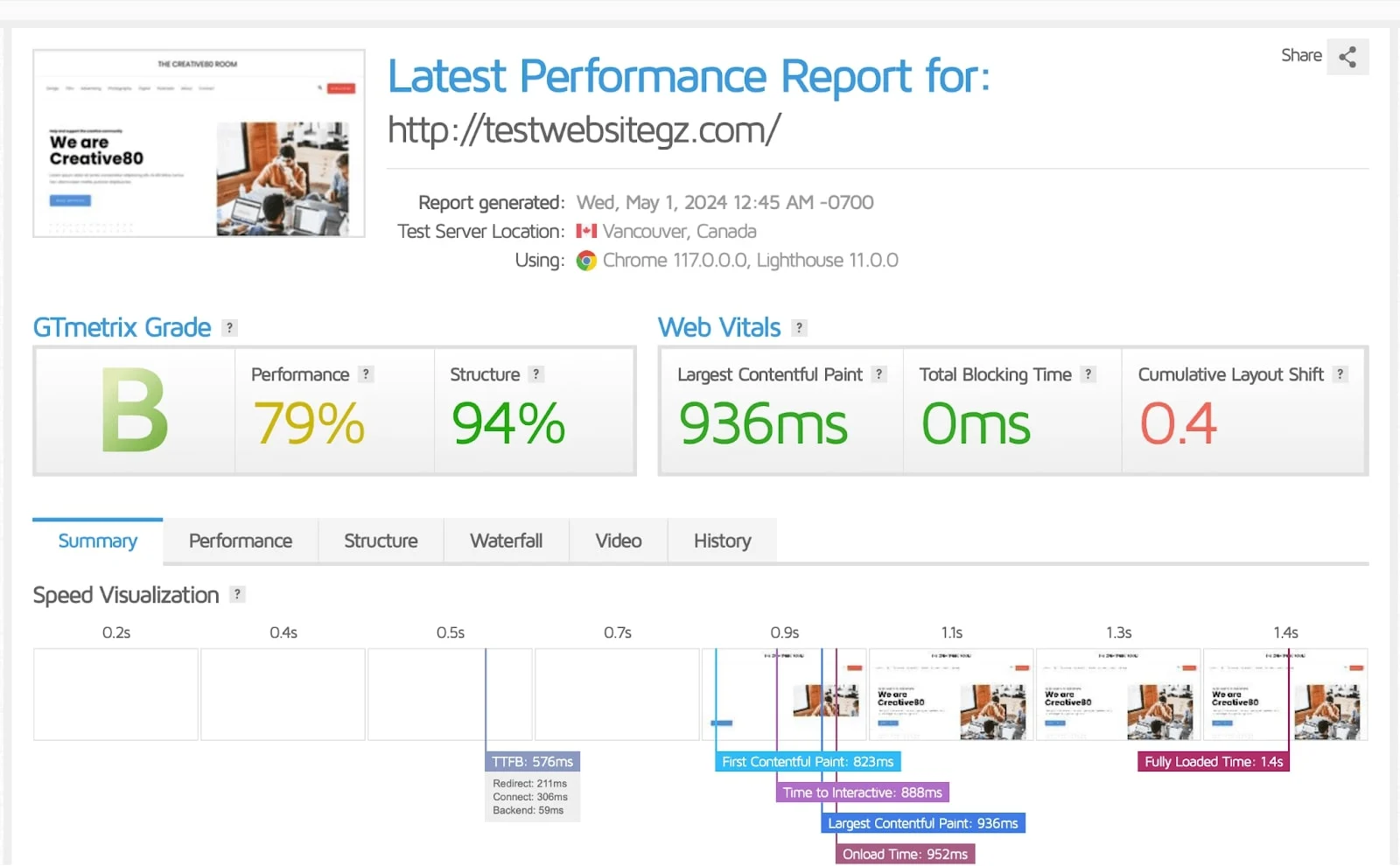
The GTmetrix report revealed that our TTFB was 576ms, well below the ideal 0.8 seconds, indicating Hostinger’s server response time is fast. Our FCP was recorded at 823ms, and the LCP at 936ms, showcasing the effectiveness of Hostinger’s LiteSpeed server technology and NVMe storage.
However, our CLS was 0.4s, which exceeds the optimal benchmark of 0.1. We attributed this to an unoptimized image loading on the test website and content shifts that displaced existing elements.
We recorded a load time of 1.4s, which is reasonable given the ideal page load time ranges between 0-2 seconds. This result further demonstrates Hostinger’s reliability for a comprehensive website, provided the right speed and performance optimizations are implemented.
Lastly, our performance and structure scores were 79% and 84%, respectively, with a GTmetrix grade of B. While this indicates the potential for slower page load times for users, the site can be improved by following the suggested performance recommendations since we did not achieve an A grade.
Here is a summary of our first Hostinger GTmetrix test:
- Time to First Byte (TTFB): 576ms
- Largest Contentful Paint (LCP): 936ms
- Cumulative Layout Shift (CLS): 0.4
- Fully Loaded Time (FLST): 1.4s
Second GTmetrix Test Result
To improve on the first test result, we used Hostinger’s website builder and updated our test website with the recommended SEO checklist, installed SSL, changed the theme to TwentyTwentyTwo, enabled LiteSpeed cache, and CDN.
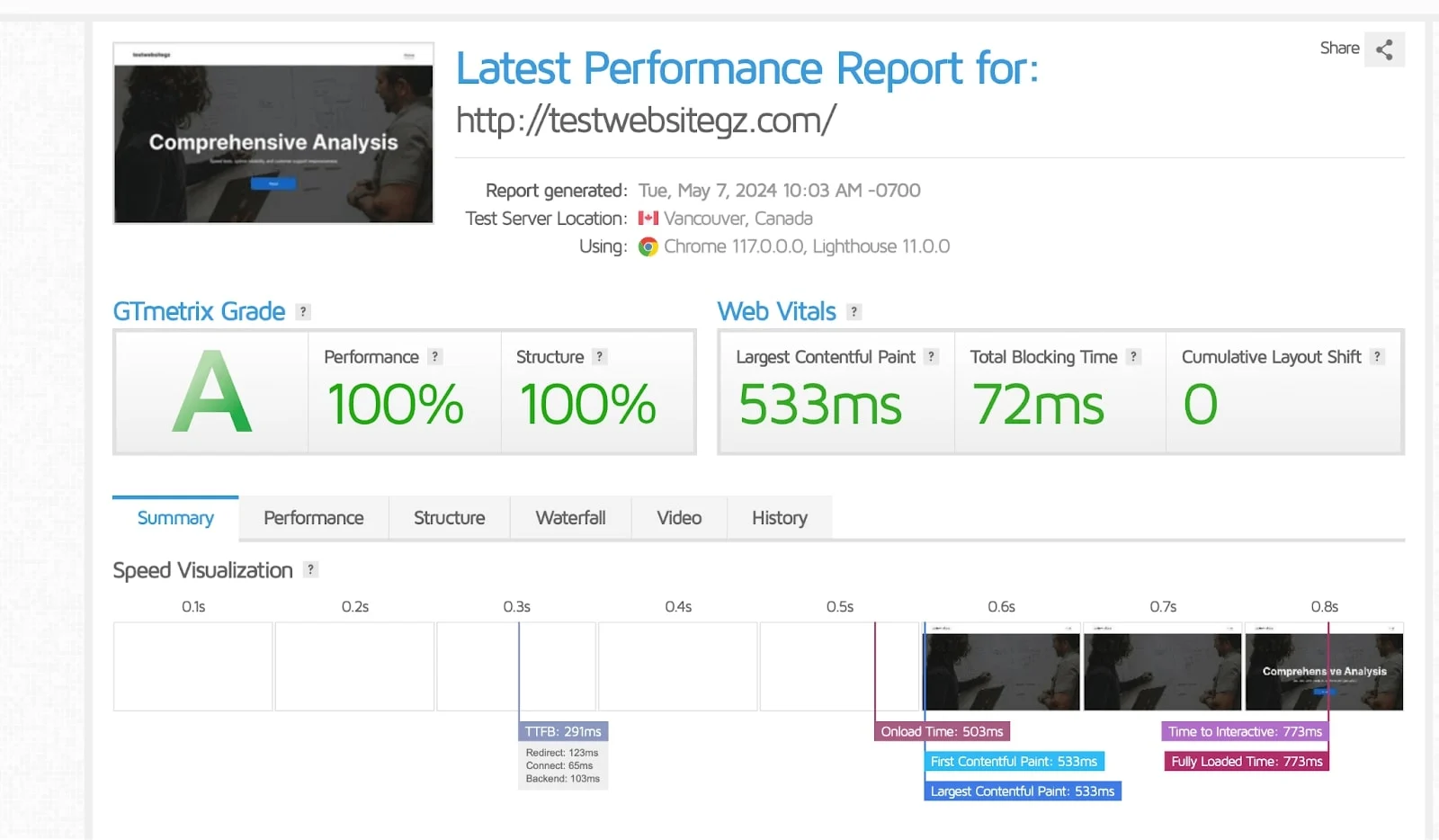
The GTmetrix report showed significant improvement compared to the first test. Our TTFB was recorded at 291ms, nearly 285ms faster than our initial result, highlighting Hostinger’s server capability to execute commands and deliver rapid responses to the browser.
Additionally, our FCP and LCP were recorded at 533ms, which is also lower than our previous results, an impressive feat considering our test website isn’t fully functional.
We also saw a marked improvement in the fully loaded time at 733ms, a 50% reduction from the earlier 1.4s. This puts our test website among the fastest on the internet, outperforming even a fully developed landing page that clocked in at 1.56s, according to a review by Website Planet on Hostinger’s site.
Lastly, we achieved a remarkable 100% in both performance and structure scores, with a GTmetrix grade of A. These results affirm Hostinger’s enhanced features, offering five times the performance and a superior website build with their AI website builder. Here is a summary of our second Hostinger GTmetrix test:
- Time to First Byte (TTFB): 291ms
- Largest Contentful Paint (LCP): 533ms
- Cumulative Layout Shift (CLS): 0
- Fully Loaded Time (FLT): 733ms
Hostinger PageInsights Tests
PageSpeed Insights is a tool created by Google to test website performance and provide recommendations for resolving identified issues. We continued our Hostinger review by using PageInsights to analyze the performance of our test webpage. Here are the results from both the mobile and desktop tests.
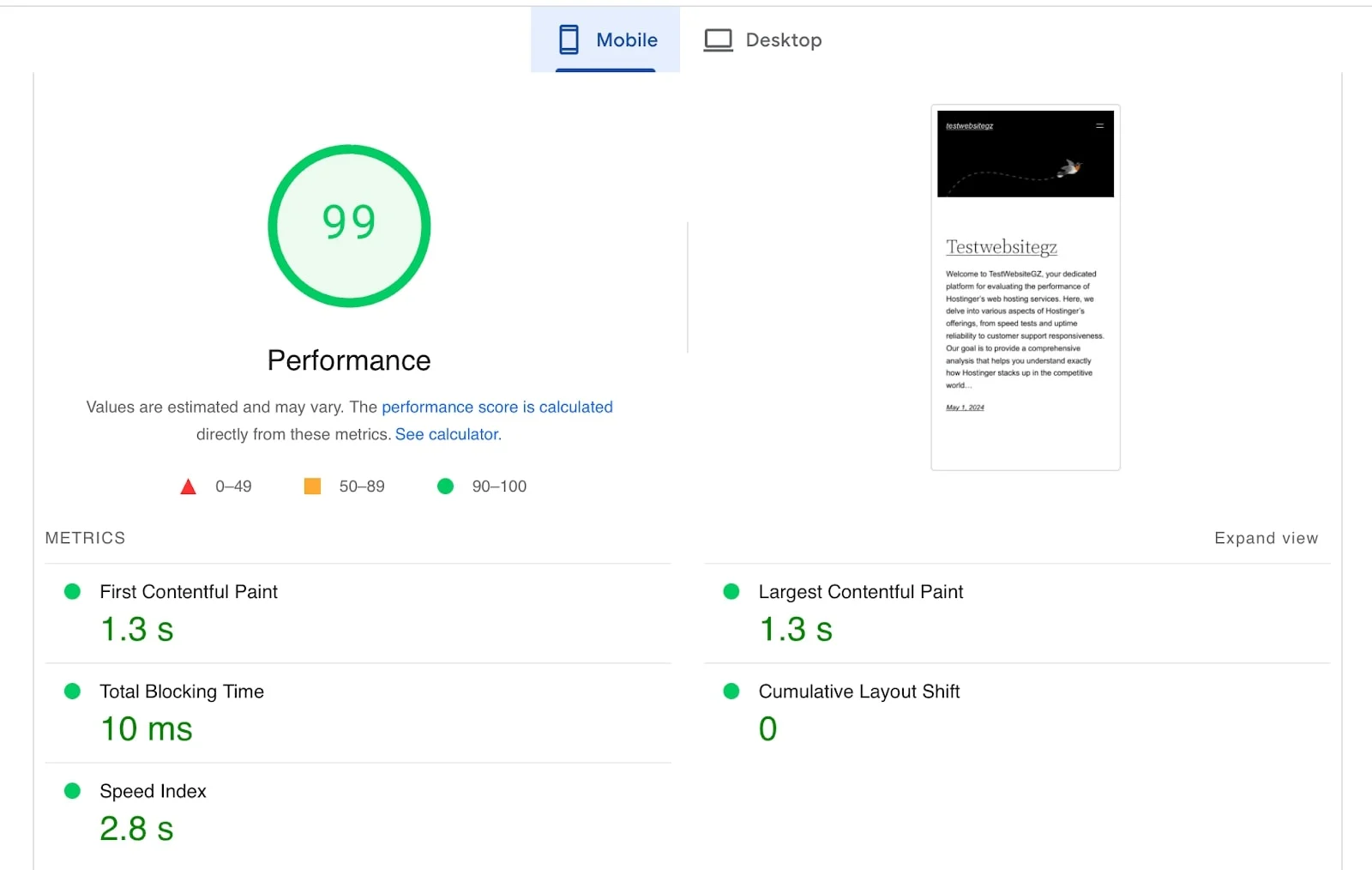
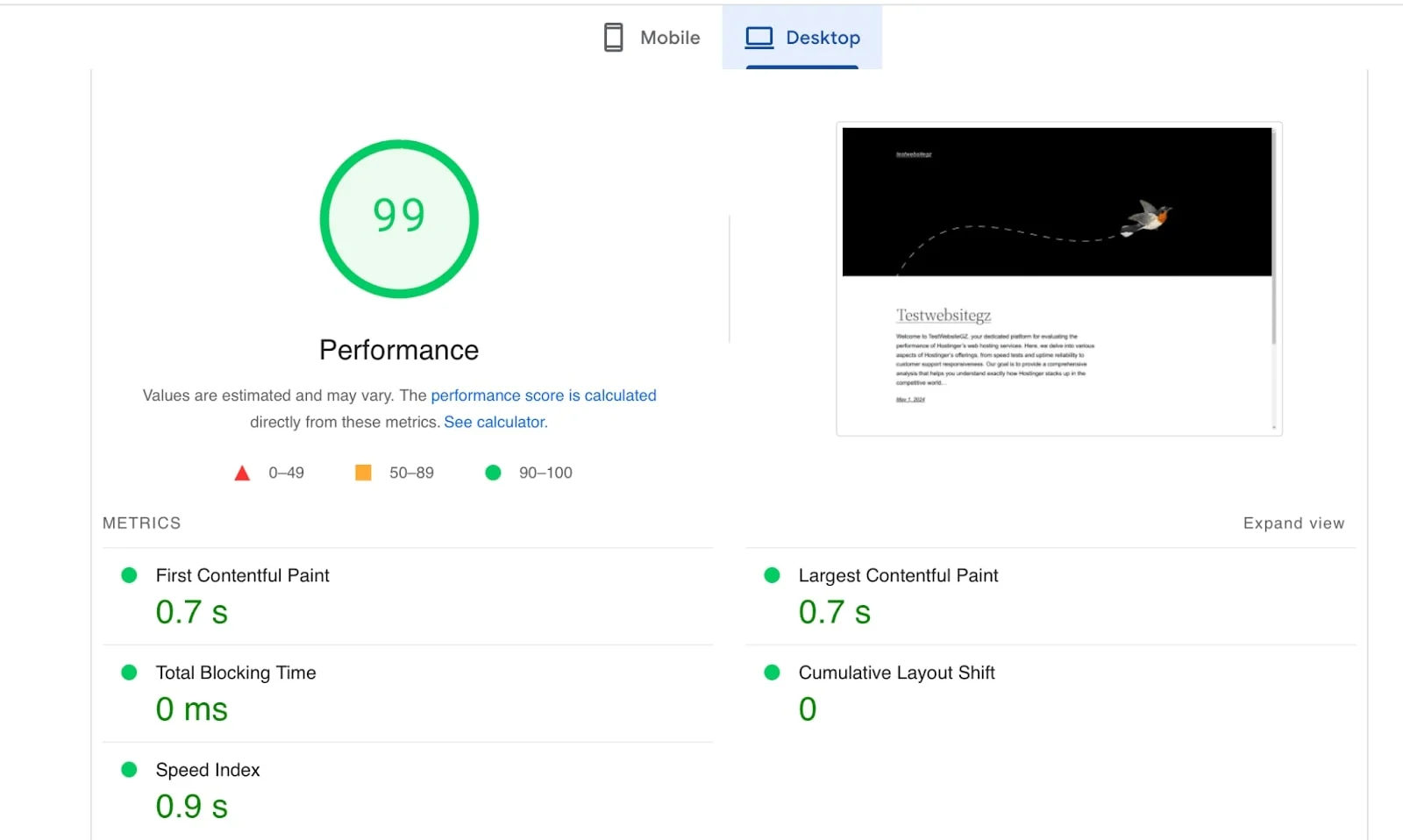
For the mobile and desktop test, we recorded a performance of 99. However, the performance metrics for both desktop and mobile are as follows:
Mobile
- 99 Performance score
- FCP: 1.3 s
- LCP: 1.3 s
- CLS: 0
Desktop
- 99 Performance score
- FCP: 0.7 s
- LCP: 0.7 s
- CLS: 0
Due to the lower processors, power, memory, and network bandwidth in mobile devices, speed tests often yield lower performance compared to desktops. Nevertheless, we still recorded an impressive 1.3s LCP, CLS score of zero, and an outstanding 99 performance score. This ensures fast speeds for our mobile users.
The desktop test also achieved a 99 performance score, with significantly lower FCP, LCP, and zero CLS.
This is particularly impressive for a test website. These speed and performance results clearly demonstrate that Hostinger is a dependable hosting provider for new website owners seeking affordable solutions that guarantee exceptional performance with advanced features.
Summary: Is Hostinger the Right Choice?
Yes, Hostinger is highly recommended and good for hosting your small, medium, and large-scale websites. According to our tests and analysis, this is the best web hosting service you can get. This review was conducted to assess the reliability of Hostinger’s services and their promises.
Our findings confirm that Hostinger provides a stable 99.9% uptime, up to 99% site performance score, advanced security features, fast loading times, and highly responsive customer support.
Hostinger’s servers use LiteSpeed web server technology and an advanced caching solution to ensure optimal performance for your website. If you’re looking to switch from an underperforming host, Hostinger also offers a free migration tool that transfers your website within 24 hours, with assistance from its support team.
Hostinger is particularly beginner-friendly with its intuitive platform, and it enables you to build your website conveniently using its AI-powered website builder. It’s worth noting that Hostinger’s pricing is most economical when opting for long-term plans, so we recommend choosing one to save costs.
FAQ
What is Hostinger, and why is it so cheap?
Hostinger is a top-rated hosting provider that helps users develop and run their websites online. It offers new customers up to 75% off regular prices, and you can also receive two free months when signing up for 48 months.
Is Hostinger a good web hosting service?
Hostinger comes highly recommended by WordPress, speaking volumes about its reputation and the quality of its hosting services. Based on our tests, Hostinger stands out as a hosting provider offering excellent value at affordable prices.
Why should I choose Hostinger?
Hostinger provides beginner-friendly tools such as their custom hPanel and AI website builder, making it easy for users with limited technical knowledge to create their websites effortlessly.
Do you get a free domain with Hostinger?
Yes, you will get a free domain for the first year with all long-term plans, excluding monthly plans.
How many websites can I host on Hostinger?
With Hostinger, you can host between 25 and 100 websites per account, depending on the hosting type and plan you choose.